Take Control of Your Entire Teaching Workflow
Teaching involves more than planning lessons. You have timetables to manage, classes to organize, students to keep track of, homework to monitor, assessments to prepare, marking deadlines to meet, meetings to attend, resources to find, and countless tasks competing for your attention.
The All-in-One Digital Teacher Planner & Timetable Management system brings your teaching workflow together in one organized place.
Instead of relying on separate planners, spreadsheets, calendars, documents, and notes, you can manage the essential parts of your teaching workflow around your timetable and keep everything connected.
Why Teachers Choose an All-in-One Planning System
When your teaching information is spread across different tools, it can take unnecessary time to find what you need and keep everything up to date.
This Digital Teacher Planner gives you a clearer way to organize your teaching life, helping you spend less time managing information and more time focusing on your students and lessons.
- See your teaching day clearly with your timetable, lessons, tasks, meetings, homework, and deadlines organized around your schedule.
- Plan lessons with less repetition by creating, duplicating, reusing, moving, and rescheduling lesson plans.
- Keep classes and students organized with class information, student records, lessons, homework, assessments, seating plans, and notes connected together.
- Stay ahead of marking by seeing upcoming marking responsibilities and estimating the time they may require.
- Keep important teaching resources together so you can find the materials you need while planning or teaching.
- Handle schedule changes more easily without having to rebuild your entire future lesson plan manually.
- Prepare for cover lessons faster by bringing relevant class, timetable, lesson, seating, homework, and instruction information together.
Your Timetable Becomes the Starting Point
Your timetable is at the center of your teaching workflow.
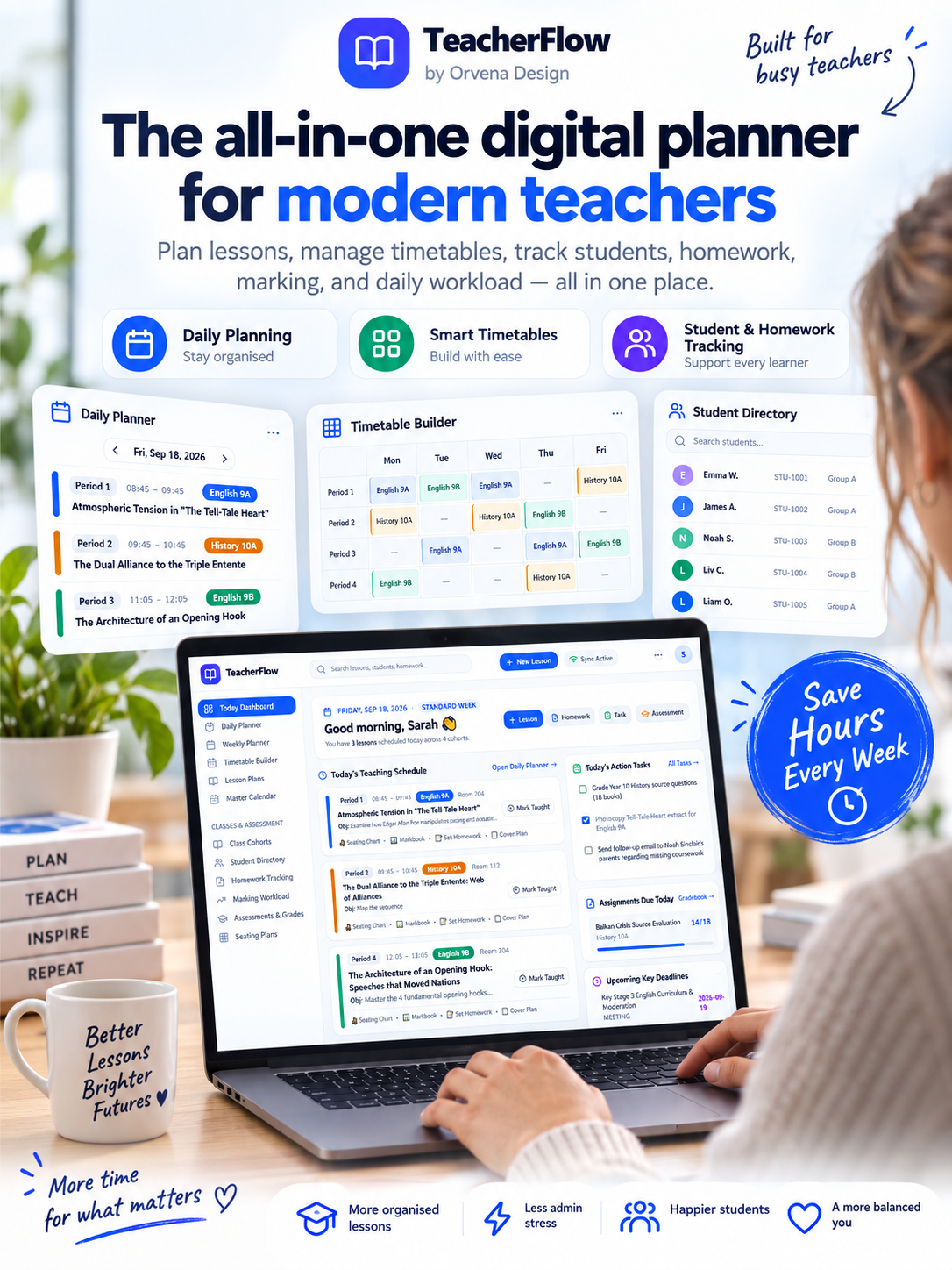
Build your schedule with subjects, classes, rooms, periods, start and end times, and notes. Support standard schedules, Week A/B schedules, and rotating timetable structures.
Once your schedule is organized, it becomes easier to see what you are teaching, plan the lessons around it, and keep your daily and weekly responsibilities aligned.
Plan Every Teaching Day With Confidence
Use daily and weekly planning views to see your teaching schedule alongside the other things that need your attention.
Move through your dates, review lessons chronologically, manage tasks and meetings, and keep track of upcoming homework and deadlines.
Instead of starting every morning by figuring out where everything is, you have a structured view of what your teaching day involves.
Create Better, More Organized Lesson Plans
Create detailed lesson plans with the information you need to prepare and reflect on your teaching, including:
- Lesson titles and classes
- Subjects and topics
- Units and curriculum connections
- Learning objectives
- Success criteria
- Starters and main activities
- Differentiation
- Assessment
- Homework
- Resources
- Notes and reflections
You can also duplicate, copy, move, reschedule, and reuse lessons, making it easier to build on previous planning instead of repeatedly starting from an empty page.
Handle Changes Without Rebuilding Everything
School schedules do not always go according to plan. Lessons can be cancelled, moved, or interrupted.
TeacherFlow helps you manage future untaught lessons when schedules change while preserving lessons that have already been taught and maintaining the order of your future teaching plan.
This means you can adapt your planning when your timetable changes without turning a single missed lesson into hours of manual reorganizing.
Keep Your Classes & Students Organized
Manage your classes from one central place with access to the information connected to each class.
Organize students, lessons, homework, assessments, seating plans, units, resources, and notes without having to search through multiple unrelated documents.
Whether you teach one class or manage several different groups, you can keep the information relevant to each class together.
Make Homework Easier to Track
Create homework with descriptions, dates, estimated marking time, resources, and notes, then track student submissions.
See submitted, late, missing, and excused work so you can quickly identify what needs your attention.
When missing work requires follow-up, you can connect it with your task workflow instead of relying on memory or scattered notes.
Plan Your Marking Workload Before It Builds Up
Marking can quickly become one of the biggest time demands in teaching.
TeacherFlow helps you look ahead at your marking workload and estimate the time required based on the number of students and your estimated marking time.
With a view of upcoming weeks, you can see where homework, tests, essays, projects, and assessments may create heavier workloads and plan your time accordingly.
Manage Assessments & Student Results
Keep tests, exams, projects, scores, dates, rooms, durations, notes, and student results organized with the classes they belong to.
Review assessment statistics such as averages, median scores, highest and lowest results, distributions, and percentages to help you keep assessment information structured and accessible.
Create Flexible Classroom Seating Plans
Build seating plans around the way your classroom works.
Create layouts with individual desks, pairs, rows, round or rectangular tables, horseshoe/U-shaped arrangements, and more. Move students, swap seats, randomly assign students, create multiple plans, and adjust your classroom layout when needed.
Whether you are preparing for a new class, changing your classroom arrangement, or planning for a particular lesson, your seating information stays available alongside your class organization.
Prepare Cover & Substitute Plans More Easily
When another teacher needs to cover your lesson, gathering the right information can take time.
TeacherFlow can bring together relevant timetable details, classes, rooms, lesson plans, instructions, resources, seating information, homework, and permitted student information into a printable cover plan.
That makes it easier to prepare a clear handover instead of collecting information from several different places.
Connect Your Curriculum to Your Lessons
Plan units with goals, standards, topics, resources, dates, notes, and assigned lessons.
Track progress and curriculum coverage while keeping your long-term planning connected to the lessons you are actually delivering.
Keep Tasks, Meetings & Contacts Under Control
Teaching comes with responsibilities outside the classroom too.
Manage everyday tasks, recurring tasks, deadlines, meetings, action points, and contact records for parents, students, colleagues, and administrators.
Meeting actions can become tasks, helping you turn notes and decisions into something you can actually follow up on.
Keep Your Teaching Resources Easy to Find
Organize teaching resources and useful links from services such as Google Drive, Docs, Slides, YouTube, OneDrive, and Dropbox.
Use tags for subjects, classes, units, and topics so you can find relevant resources more easily when planning your next lesson.
Everything Works Together
The biggest difference is not simply how many features are included. It is how the different parts of your teaching workflow are designed to connect.
Your timetable can guide your daily planning. Your lessons connect with classes and units. Homework connects with deadlines and marking. Assessments connect with classes and workload planning. Meeting action points can become tasks. Cover planning can bring together the information needed for a particular lesson.
Instead of managing isolated pieces of information, you can manage your teaching workflow as one connected system.
Who Is This Digital Teacher Planner For?
The Digital Teacher Planner is designed for teachers who want a more organized way to manage the many moving parts of their professional life.
Primary & Elementary Teachers
Organize your timetable, lessons, classes, students, homework, resources, daily planning, and curriculum work in one place.
Secondary & High School Teachers
Manage multiple classes, subjects, timetables, assessments, homework, student information, and marking responsibilities without relying on disconnected systems.
Teachers With Rotating Schedules
If your school uses Week A/B or rotating timetable structures, you can organize your schedule around the way your teaching week actually works.
Teachers Managing Multiple Classes
Keep class-specific lessons, students, homework, assessments, seating plans, units, resources, and notes organized so you can quickly find the information you need.
Teachers With Heavy Marking Workloads
Look ahead at upcoming marking responsibilities and understand where your workload may become heavier, giving you a clearer picture of the weeks ahead.
Teachers Who Are Tired of Using Multiple Planning Tools
If your teaching information is currently spread across notebooks, spreadsheets, calendars, documents, and separate apps, this system gives you a more structured way to bring your everyday planning together.
Built for Your Complete Teaching Workflow
From the moment you start planning your timetable to the moment you finish marking student work, TeacherFlow is designed to support the different stages of your teaching workflow.
- Timetable and schedule management
- Daily and weekly planning
- Lesson planning
- Classes and student management
- Homework and submission tracking
- Marking workload planning
- Assessments and results
- Seating plans
- Cover and substitute planning
- Curriculum and unit planning
- Tasks and deadlines
- Meetings and action points
- Contact records
- Trips and visits
- Teaching resources
- Calendar and school dates
- Teaching and workload analytics
Designed Around a Teacher's Real Day
TeacherFlow is built around a simple idea: your planning system should make your teaching life easier to manage, not create more work.
Instead of constantly asking yourself where you saved a lesson, which class needs homework checked, when your next assessment is due, or how much marking is waiting for you, you can organize these responsibilities within one connected workflow.
Plan your lessons. Organize your classes. Track your students. Manage your workload. Stay on top of your timetable.
Ready to Simplify Your Teaching Workflow?
If you want to spend less time managing scattered teaching information and more time focusing on teaching, the All-in-One Digital Teacher Planner & Timetable Management system gives you one structured place to organize your teaching workflow.
Bring your timetable, lessons, classes, students, homework, marking, assessments, resources, and everyday teacher tasks together.
Make your teaching workflow easier to organize, easier to follow, and easier to manage.